Quick question before we start.
Go to Google right now and search for your own business name.
Did it show up?
If the answer is no, or if it showed up but looked incomplete, had wrong information, or had zero reviews, this article is going to change that for you today.
Setting up your Google Business Profile is completely free, takes less than 30 minutes, and can put your business in front of thousands of people searching for exactly what you offer. Yet most Pakistani businesses have never done it.
Let us fix that right now, step by step.
Most people have seen it but never knew what it was called.
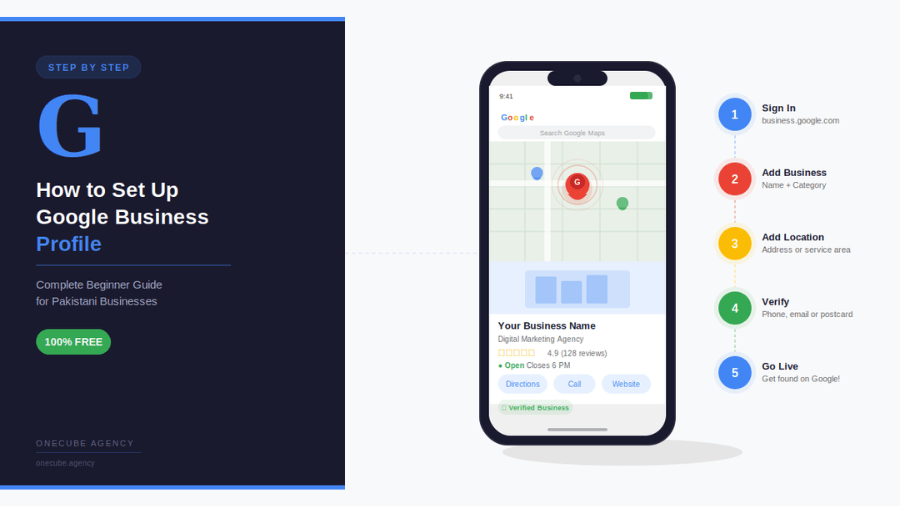
You know that box that appears when you search for a restaurant or a shop, the one with the photos, the star ratings, the phone number and the map? That is a Google Business Profile.
Here is the question that matters: when your potential customers search for what you offer, whose profile are they seeing?
Your competitor’s? Or yours?
If you do not have a Google Business Profile set up right now the answer is your competitor’s. Every single day.
Let us change that.
Open your browser and go to business.google.com
Click the blue button that says “Manage now” or “Get started.”
You will need to sign in with a Google account. Use your business Gmail if you have one. If you do not have any Gmail account at all, create one at gmail.com first. It takes two minutes.
Quick check: Do you know which Gmail you want to use for your business? Write it down before you continue so you do not accidentally set up your profile under a personal account you share with your kids.
Type in your business name exactly as it appears on your signboard, your invoices, or your website.
Do NOT do this “Best Web Agency Karachi OneCube Fast Cheap SEO Design.” Google can suspend your account for stuffing keywords into your business name. Just your clean real business name.
Ask yourself: Is this the name my customers already know me by? If yes, use it exactly as is.
If Google shows you a suggestion that already matches your business it may already exist in their system. Select it and claim it. If not click “Create a business with this name.”
Stop here and think carefully, this step matters more than most people realize.
Your category is how Google decides when to show your business in search results. Pick the wrong one and you will show up for the wrong searches. Pick the right one and Google starts working for you automatically.
Type in the closest match to what your business actually does. Some examples:
Question for you: If your ideal customer was searching Google right now what words would they type? Your category should match that as closely as possible.
You can add more categories later but your primary category is the most important one, choose wisely.
Here is where people get confused, but it is actually simple.
Google asks if you have a physical location customers can visit.
If yes: Enter your full address. Google will put a pin on Maps so customers can find you, get directions, and walk through your door.
If no: Select service area business instead. You can list the cities or areas you serve. This works perfectly for freelancers, home businesses, delivery services, or agencies like us at OneCube that work with clients across Pakistan.
Think about it, which type of business are you? Answer honestly because this affects how your profile appears to customers.
Simple step. Do not skip it.
Add your phone number, the one you actually answer. Not the one that rings to an empty desk. Not the one your intern checks once a week. The one where a real human picks up.
Add your website URL if you have one.
Do you have a website? If not, this is your sign. A business without a website in 2025 is leaving serious money on the table. It is the single biggest thing you can do for your online credibility. But that is a conversation for another article. For now add whatever you have.
This is the step where most people get stuck and give up.
Do not give up.
Google needs to confirm your business is real before they will show it to searchers. They will offer you one or more options:
Pick the fastest option available to you and follow the instructions.
Here is the most important thing: Do NOT skip verification. An unverified profile basically does not exist as far as Google Search is concerned. Verify it. Even if it takes two weeks for a postcard. It is worth the wait.
Here is a question most people never ask themselves, if a customer landed on your Google profile right now would they be impressed or would they see a half empty page with no photos and no information?
Because that first impression matters enormously.
Google rewards complete profiles with higher rankings. And customers trust complete profiles more. Here is what to fill in:
Business hours: Every day of the week, Be accurate, Nothing frustrates a customer more than showing up to find you closed when Google said you were open.
Photos: Add at least 5. Your logo, your workspace, your team, your work samples. Businesses with photos get 42% more clicks than those without. Forty two percent. For free.
Business description: 2 to 3 sentences. What do you do? Who do you help? What makes you different? Write it like you are talking to a customer not a robot.
Services or products: List everything you offer. The more complete this section the better Google understands your business.
Stop and think: When did you last update your business information anywhere online? If the answer is “I can’t remember” today is the day.
Let us be direct with you.
Reviews are the single most powerful thing you can do for your Google ranking after setting up your profile.
More reviews. Higher ranking. More visibility. More customers. It is that simple.
So here is your action step right now think of three clients or customers who genuinely liked working with you or buying from you. Message them today. Send them your Google review link (you will find it in your Google Business Profile dashboard) and ask them politely for an honest review.
Three reviews can move you ahead of competitors who have been in business for years but never asked for a single review.
Will you actually do this today? Or will you read this, nod, and forget about it by tomorrow?
We are asking because we have seen this pattern too many times. The businesses that take action today are the ones showing up on page one next month.
Your profile usually starts appearing in search results within 1 to 2 weeks of verification. Be patient, it is working.
To keep it performing well:
You just read this entire guide.
Now the only question that matters is, are you going to open business.google.com in the next 10 minutes and actually do this?
Because the business down the road from you? They probably are not. Which means this is your chance to get ahead of them for free.
Go do it. Right now. We will be here when you have questions.
At OneCube Agency we help Pakistani businesses get found online through SEO, web development, and digital strategy. If you want to go beyond Google Business Profile and build a full online presence, drop a comment below or visit www.onecube.agency
And if you found this guide helpful, share it with a business owner who needs it. You might just change their business.
(Note: All images taken from Shutterstock)